INTEGRATED PRODUCTION PLATFORM
One platform for the whole plant — planning to dispatch.
Production Genie connects planning, production monitoring, process, flow, quality, counting and dispatch into one system — configured to your company, your plants, your lines, your shifts and your operators. Run it on the cloud, on your own servers, or fully integrated with KVAR sensors, loggers and displays.
A standalone monitor reports one line’s numbers. Production Genie runs the whole operation — every module, every line, every site, on one platform.
Standalone tells you. Integrated runs it.
A standalone production monitor is a complete answer for one line — live count, OEE and downtime on the machine. Production Genie is the step up: the same production intelligence, plus planning, process, flow, quality, counting and dispatch, joined together and rolled up across every plant you run.
Seven modules, one platform
Take one module, take them all, or keep scaling — add modules, lines and plants on the same platform, with the same login, whenever you are ready. Every module comes with the counters, sensors, displays and alarms it needs, in Basic, Advanced and Premium editions.
Planning
Capacity-based plan & schedule
Production Monitoring
Live output, OEE, downtime
Quality
Inspection, rejections, RCA
Truck Terminal
Bag counting & dispatch
Counting
Piece & batch counting
Process Monitoring
Parameters & batch
Flow Monitoring
Flow, batching, dosing
Who it is for
On the floor
MODULES
Seven modules that share one set of data
Because they run on one platform, the plan knows the machine’s real capacity, quality knows the shift, and the count feeds them both — without anyone re-keying anything.
MODULE 01
Planning
Plans the order book against real capacity — each order costed in stage times, scheduled against the hours the teams actually have, and released to the floor as clockable work. A promise date is calculated, not guessed.
MODULE 02
Production Monitoring
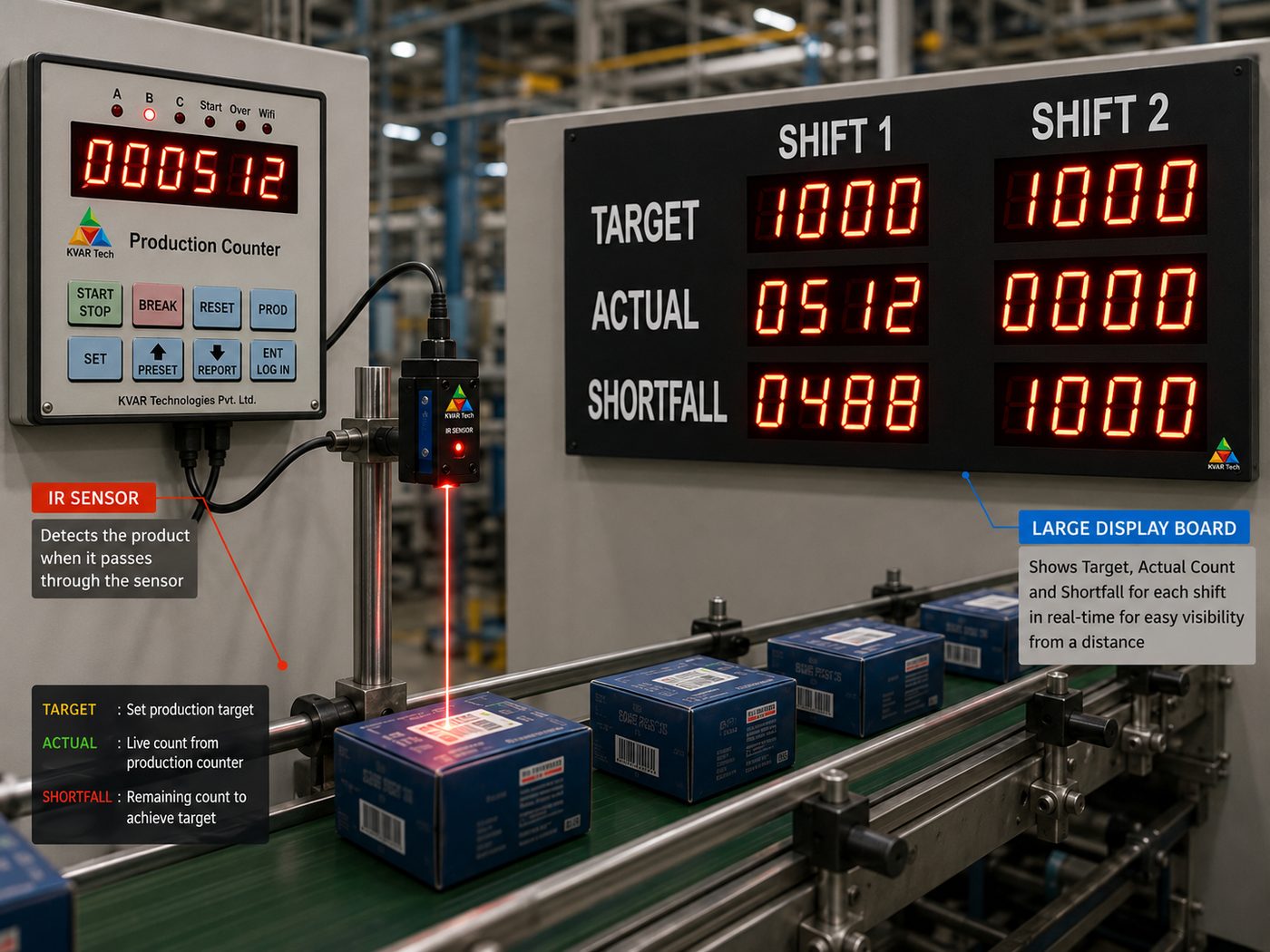
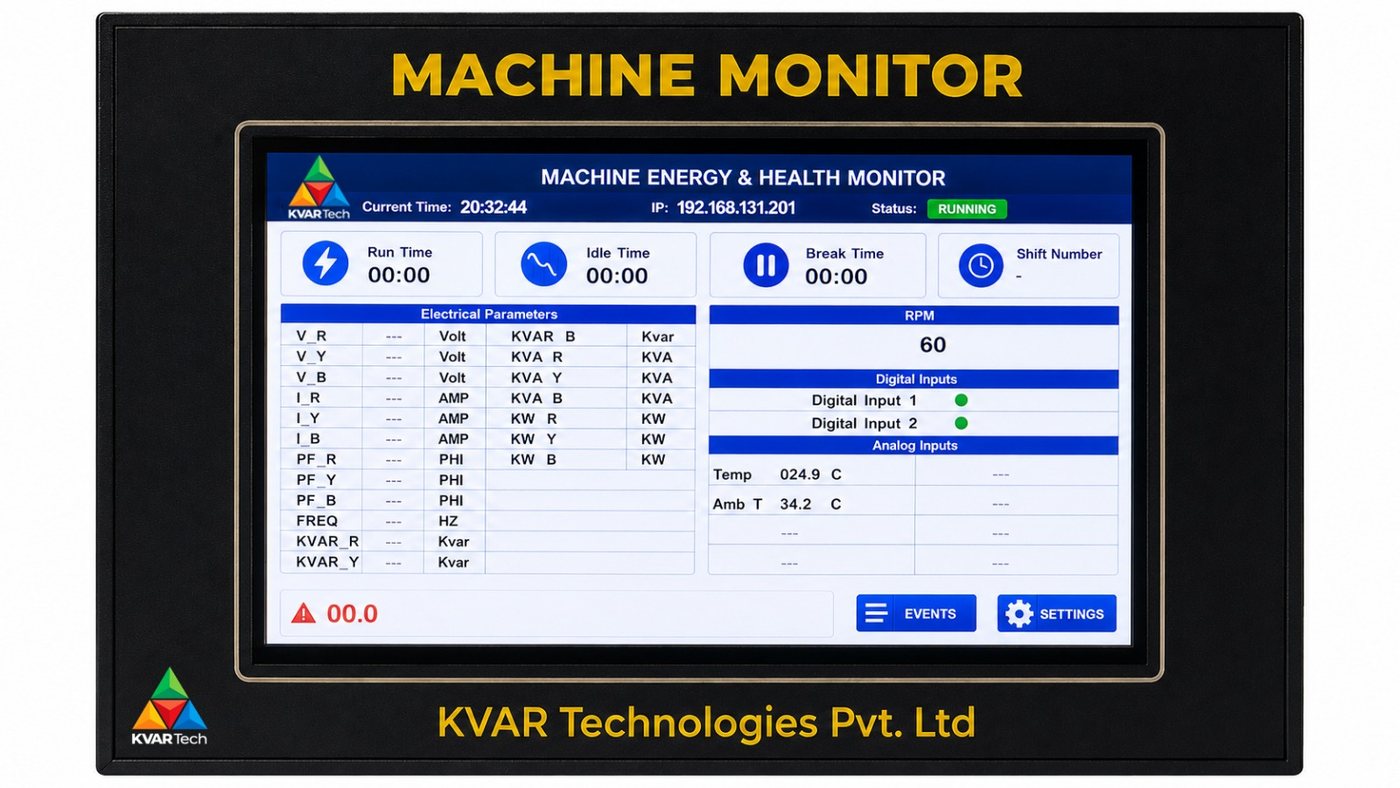
Live output against target, OEE, and downtime with reasons — per line, per shift and per operator. The integrated version of the standalone monitor, rolled up across the plant.
MODULE 03
Quality
Inspection and rejection captured as it happens, against a checklist, with root-cause and recurring-defect analysis — quality reported per line and per shift, not as one monthly number.
MODULE 04
Truck Terminal
Bags counted on the conveyor by hybrid sensing, verified against the dispatch lot and cross-checked on weight; the bay barrier releases only on a complete lot, printing a dispatch slip from measured data. Truck Terminal is also available as a dedicated solution in the catalogue.
MODULE 05
Counting
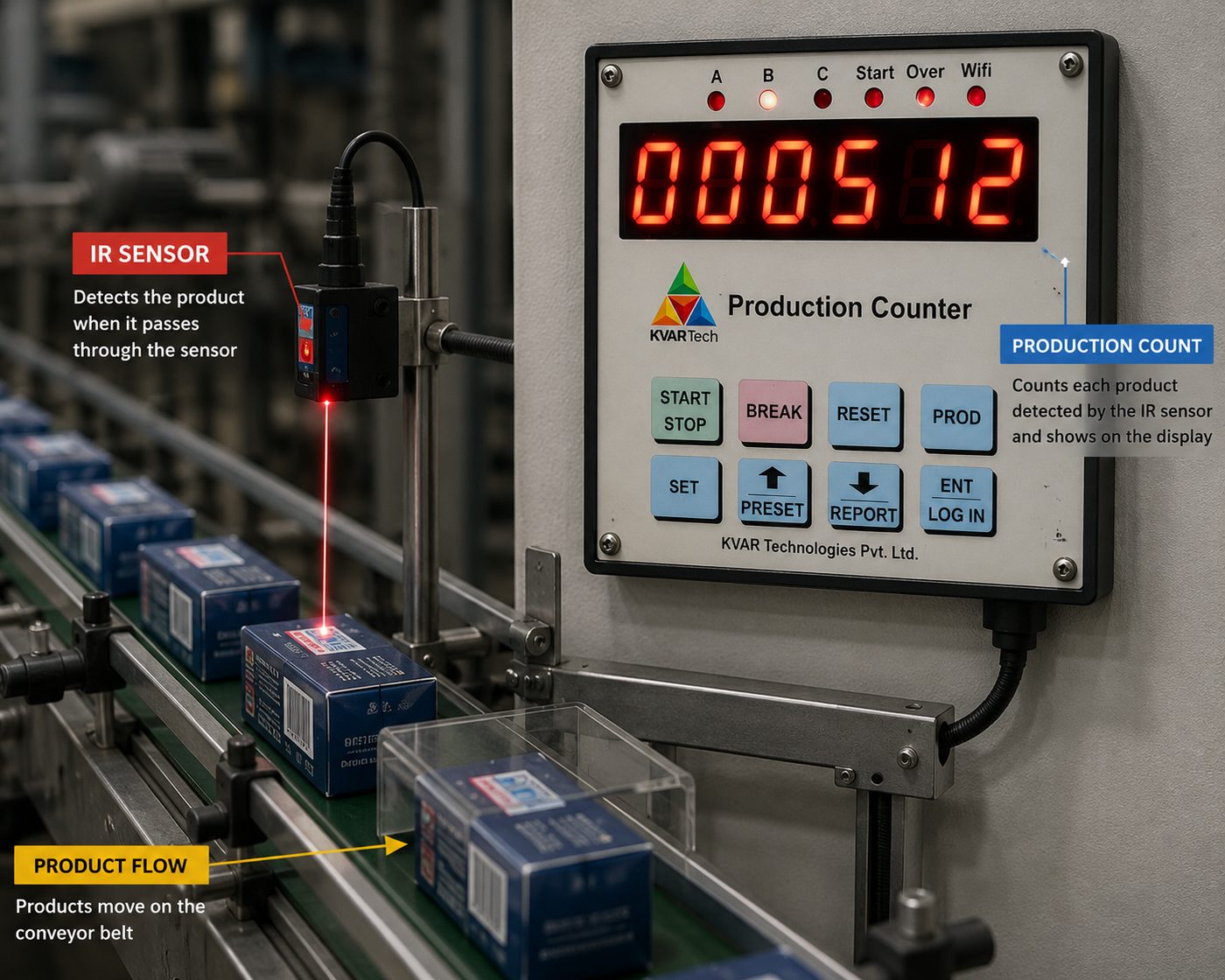
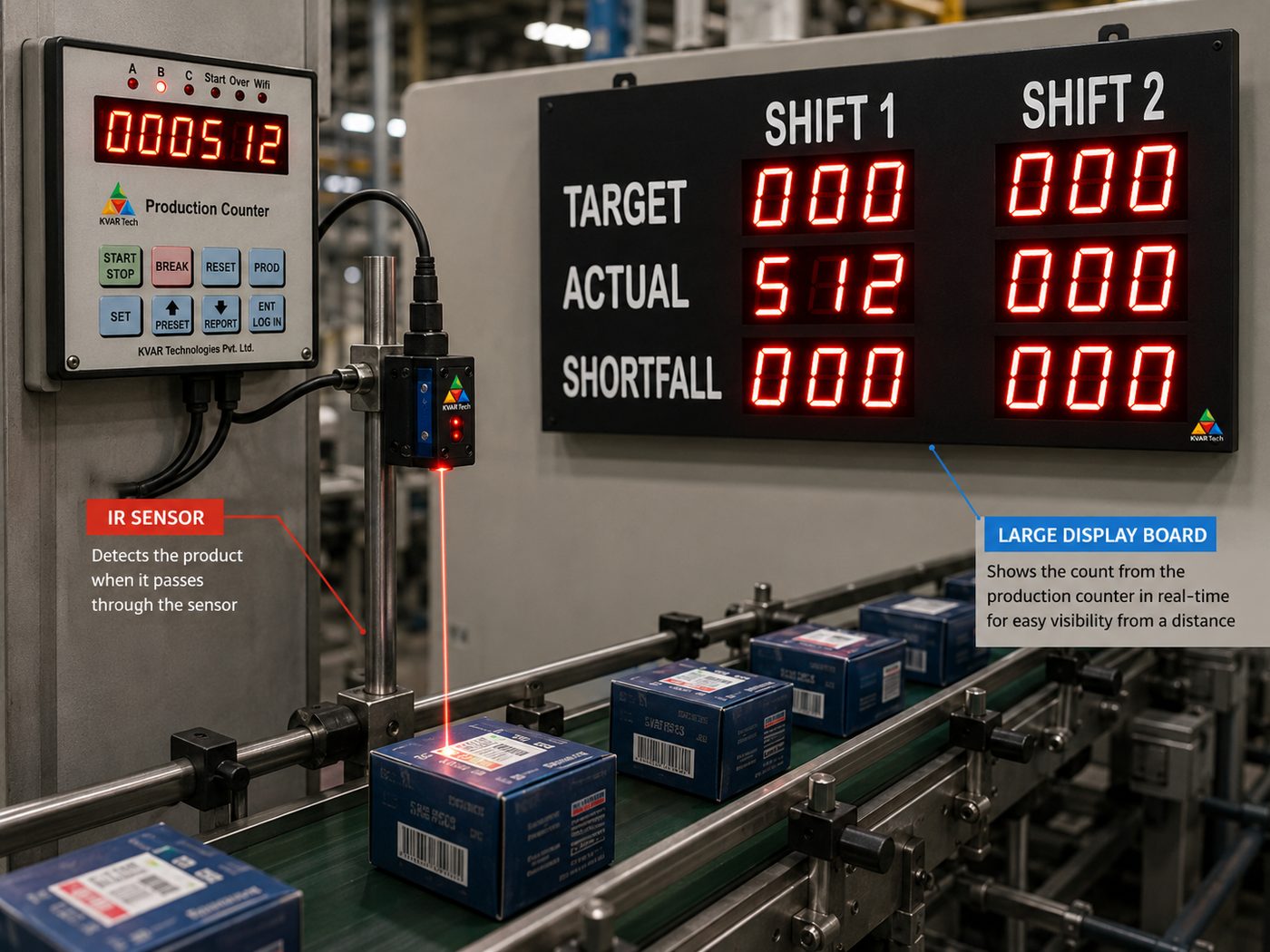
Accurate piece and batch counting on any line — parts, packs or bags — with pro-rated targets, reject counts and a large display the whole floor can read. The count everything else builds on.
MODULE 06
Process Monitoring
Critical process parameters logged continuously with high/low bands, so a deviation raises an alert while it can still be corrected, and the batch record writes itself.
MODULE 07
Flow Monitoring
Flow totalising for batching, dosing and utilities — consumption logged per line, per batch and per shift, with alerts on abnormal flow.
■ ON THE MACHINE
The smart production monitor at the heart of every line
Production Monitoring is delivered by a smart OEE monitor that installs where a plain counter used to sit — running standalone on a single machine, or reporting into the full platform. The same box that shows the count also knows the target, the reason the line stopped, and the shift it belongs to. Why spend on a plain counter when future-ready OEE comes at a marginal step up?
| CAPABILITY | ORDINARY COUNTER | KVAR SMART MONITOR |
|---|---|---|
| Tells you the count | ✓ | ✓ |
| Tells you the target & if you are on pace | – | ✓ |
| Tells you WHY the line stopped | – | ✓ |
| Tracks OEE / efficiency % | – | ✓ |
| Per-shift & per-operator data | – | ✓ |
| Live web dashboard & cloud reporting | – | ✓ |
| 8-hour trend, shift history, downtime log | – | ✓ |
| Grows with you — no rip & replace | – | ✓ |
TECHNICAL OVERVIEW
A full OEE platform where a counter used to be
Hardware inputs feed a real OEE engine, an on-board web server, cloud and MQTT connectivity and persistent on-device storage — in two form factors that share one firmware and one web interface.
OEE engine
Availability, performance, quality; run, idle, break and downtime states; per-shift OEE, rejects and efficiency.
Flexible inputs
Count, reject, reset and break channels; digital and opto-isolated; per-channel debounce; each input’s function set by configuration, not by wiring.
Shifts & targets
Up to three shifts including a midnight wrap; configured and pro-rated hourly targets; target-mode relay control.
Connectivity
On-board web server; MQTT and HTTP cloud. AES-secured; e-mail reporting; UDP display feed.
On-device history
FRAM eight-hour ring and last-shift archive, plus SD-card session, hourly and downtime logs on the LCD model.
Downtime capture
Reason codes per stop and per break; Top-Loss aggregation; audit trail.
■ TWO FORM FACTORS
One platform. Two models. Your choice of fit.
Same firmware, same web dashboard, same cloud. Pick the fit and the budget line by line, without learning two systems.
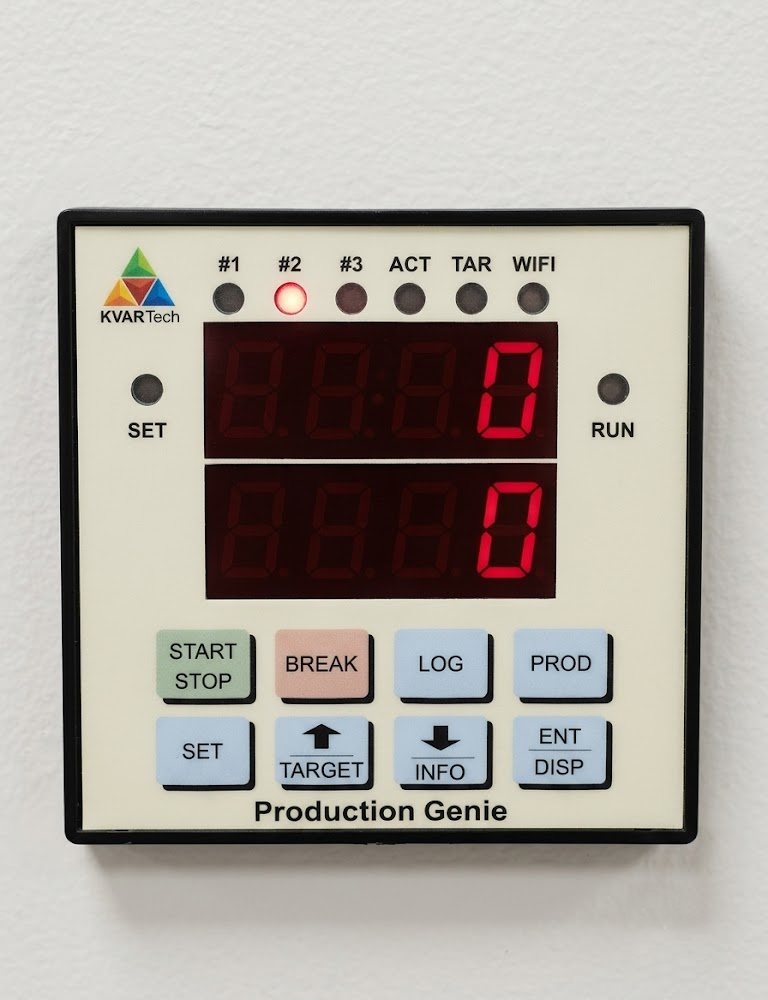
LED Model
BRIGHT FLOOR DISPLAY + KEYPAD
- Large dual-row LED digits — count and target visible across the shop floor
- Rugged 8-key keypad operation — no touchscreen to damage
- Status lamps: shift, run, target and Wi-Fi at a glance
- Numeric login, product, break and target entry
- Same web dashboard and cloud as the premium model
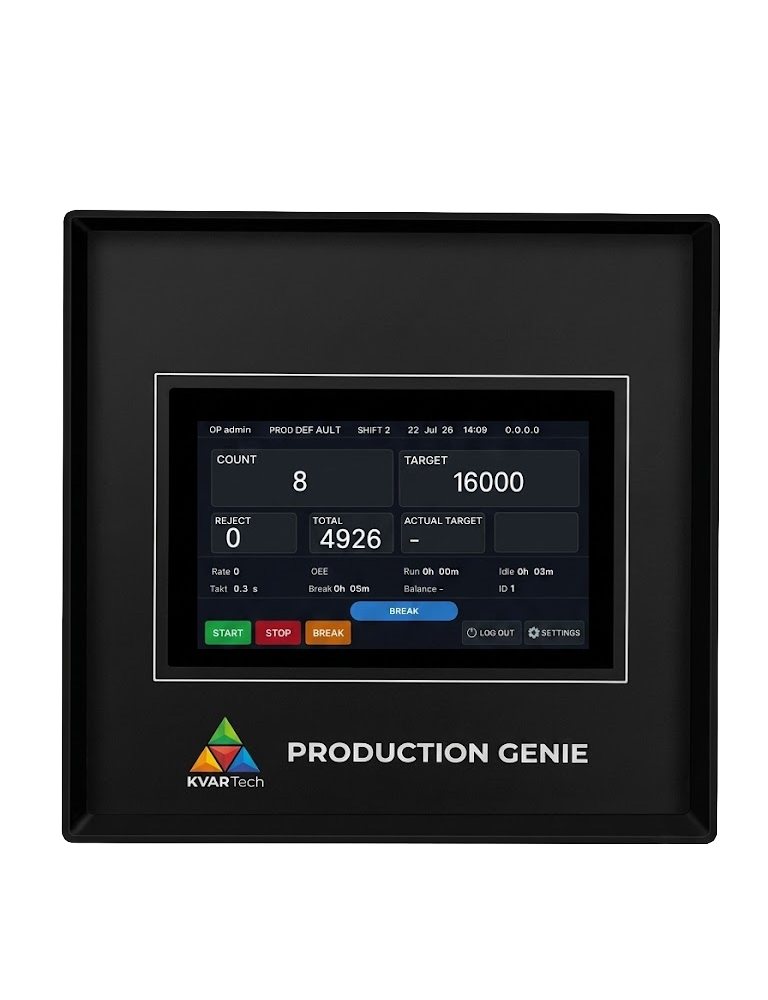
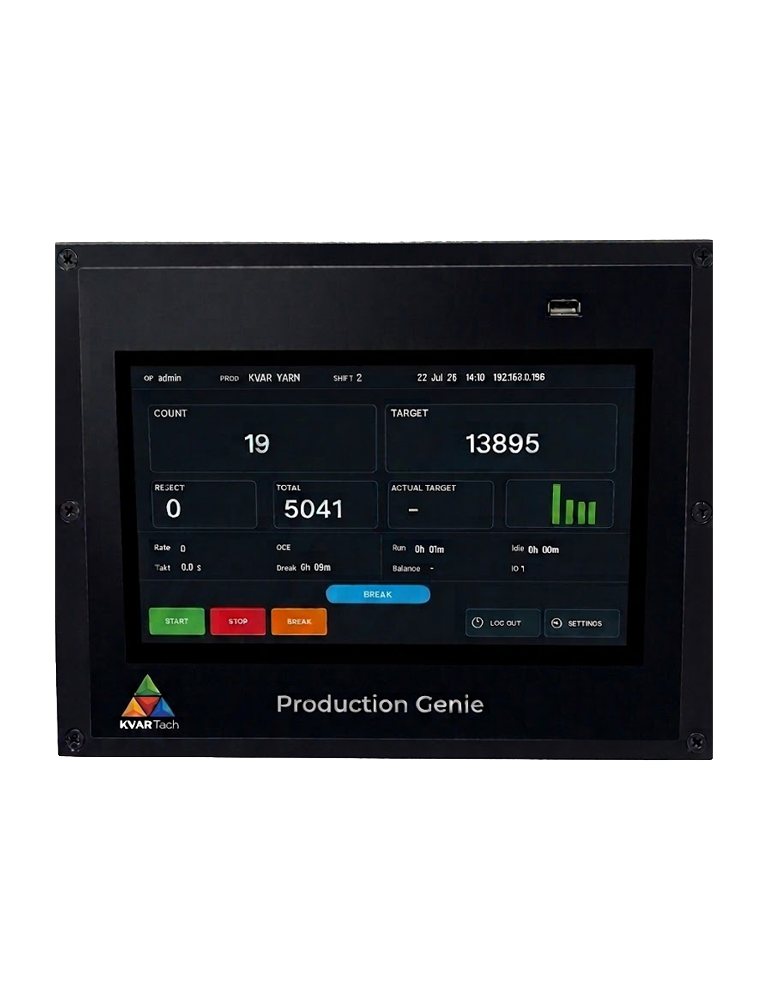
LCD Model
COLOUR TOUCHSCREEN
- Full-colour touchscreen dashboard on the machine
- On-screen reason picker, product and settings
- SD-card long-term history and Top-Loss analysis
- Richest on-device experience
- Same web dashboard and cloud as the LED model
Model selection guide
| CONSIDERATION | LED MODEL | LCD MODEL |
|---|---|---|
| On-device display | Dual-row LED digits + status lamps | Colour touchscreen |
| Operation | 8-key keypad | Touch |
| Long-term on-device logs | Web / cloud + recent on-chip | SD-card history + Top-Loss |
| Floor visibility | High — large digits | On-machine |
| Environment | Rugged, no touchscreen | Interactive |
| Web dashboard & cloud | Yes | Yes |
FEATURE & BENEFIT GUIDE
What each feature does — and what you gain.
Every capability of the production monitor paired with the benefit it delivers, and the model that offers it.
| FEATURE | WHAT IT DOES | WHAT YOU GAIN | LED | LCD |
|---|---|---|---|---|
| PRODUCTION & OUTPUT | ||||
| Live production count | Counts good parts in real time, with a configurable multiplier for any pulse-to-unit ratio. | Accurate output on the floor and on the web — no manual tallying, no miscounts. | ✓ | ✓ |
| Reject / quality count | Separately tracks rejected parts alongside good parts. | Your true quality rate, not just gross output — the Q in OEE. | ✓ | ✓ |
| Configured target | Sets the production target for the run or shift. | A clear goal on every line — everyone knows the number to hit. | ✓ | ✓ |
| Actual (incremental) target | A live pro-rated target that grows through the shift — the should-be-by-now figure. | Operators see whether they are ahead or behind at this moment — pace correction in real time. | ✓ | ✓ |
| Relay output | On-board relay driven by production events, such as target reached. | Trigger a lamp, buzzer, gate or machine action automatically — hands-free control. | ✓ | ✓ |
| SHIFT INTELLIGENCE | ||||
| Shift tracking | Up to three shifts per day, including a shift that wraps past midnight. | Production is attributed to the correct shift automatically — fair, accurate shift-wise reporting. | ✓ | ✓ |
| Per-shift OEE & efficiency | Availability, performance and quality computed per shift. | Compare shifts objectively — spot the shift that underperforms, and why. | ✓ | ✓ |
| Overtime calculation | Production beyond the scheduled shift is tracked as overtime. | Fair, automatic overtime accounting — no manual timekeeping disputes. | ✓ | ✓ |
| Recent-shift history | The most recent completed shifts are retained on the device. | Recent performance available even without a PC or network — review at the machine. | ✓ | ✓ |
| Shift-wise data filing | Output, rejects, run/idle/break time and target are filed against the shift. | A complete shift record — the basis for accountability and improvement. | ✓ | ✓ |
| DOWNTIME, LOSSES & ANDON | ||||
| Stoppage reason tracking | Every stop can capture a reason — numeric on LED, on-screen picker on LCD. | Know WHY the line stops — the single most valuable data a counter never gives you. | ✓ | ✓ |
| Top-Loss analysis | Downtime aggregated by reason over time. | Your biggest recurring losses, ranked — fix the costliest problem first. | – | ✓ |
| Run / idle / downtime states | The engine distinguishes running, idle and downtime automatically. | True availability measurement — the A in OEE, without manual logging. | ✓ | ✓ |
| Andon signalling | Break and stoppage states are signalled to a tower lamp or Andon display. | Supervisors see line status across the floor at a glance — faster response. | ✓ | ✓ |
| Audit trail | Key events are logged for review. | Traceability for disputes, audits and continuous-improvement reviews. | – | ✓ |
| BREAKS | ||||
| Breaks during a shift | Scheduled and operator breaks are recognised and excluded from downtime. | Planned breaks do not unfairly hurt your OEE — numbers reflect real performance. | ✓ | ✓ |
| Break entry & exit confirmation | Entering and leaving a break is confirmed on the keypad or screen. | No accidental breaks; break time is logged deliberately and accurately. | ✓ | ✓ |
| Break reason (connected modes) | A break number or reason can be captured when connected. | Distinguish tea-break from changeover from maintenance — richer loss analysis. | ✓ | ✓ |
| External break input | A hardware break switch or button can trigger a break directly. | Wire in an existing break signal — the operator need not touch the unit. | ✓ | ✓ |
| Momentary or maintained break input | The break input works as a push-button or a latching switch, with adjustable debounce. | Fits whatever break hardware you already have — no rewiring, no false triggers. | ✓ | ✓ |
| HISTORY, TIME & TRENDS | ||||
| Last-8-hour production tracking | Hourly output for the last eight hours is stored on-device and graphed. | Spot the hour when things slowed — a live pulse of the line, even without a card or PC. | ✓ | ✓ |
| Built-in SD card storage | Daily session, hourly and downtime data stored to an on-board SD card. | Deep day-by-day history retained on the device — nothing lost. | – | ✓ |
| NTP time synchronisation | The clock synchronises automatically over the network. | Every record carries the correct time — accurate, tamper-resistant timestamps across all units. | ✓ | ✓ |
| Downloadable reports | Records can be downloaded from the built-in web page. | Get data into Excel without pulling a card — reporting made easy. | ✓ | ✓ |
| ACCESS & CONTROL | ||||
| Operator login | Mandatory numeric or credential login before operating. | Output and events are tied to who was running the line — accountability. | ✓ | ✓ |
| Product selection | Select the running product; the name shows on the web and remote view. | Production is recorded against the right product — correct product-wise data. | ✓ | ✓ |
| Role-based web access | Admin-protected settings; operators cannot change configuration. | Settings stay safe from accidental change on the floor. | ✓ | ✓ |
| CONNECTIVITY & REPORTING | ||||
| Built-in web dashboard | Every unit serves its own live dashboard and settings pages over Wi-Fi. | Monitor and configure from any phone or PC — no extra software to install. | ✓ | ✓ |
| Cloud reporting (MQTT / HTTP) | Secure, AES-encrypted push of production data to a central server. | Roll up many machines to one place — plant-wide visibility. | ✓ | ✓ |
| E-mail reporting | Reports can be delivered by e-mail. | Shift and production summaries arrive automatically — no one has to fetch them. | ✓ | ✓ |
| Remote production display | Output can be mirrored to a large remote LED display. | Show live numbers to the whole floor, or to a supervisor’s office. | ✓ | ✓ |
| Standalone or connected | Runs fully offline, or reports to the cloud — your choice. | Works with or without IT infrastructure — deploy anywhere, expand later. | ✓ | ✓ |
| STORAGE & CONFIGURATION | ||||
| Tiered on-device storage | Fast-write memory for counters, durable memory for settings, card storage for logs. | Data survives power cuts; the right store for each job — robust in a factory. | ✓ | ✓ |
| Save confirmation | Every web setting change confirms success or shows the exact error. | No guessing whether a change took — fewer setup mistakes. | ✓ | ✓ |
| Configurable inputs | Each input’s role — count, reject, reset or break — is set in software. | Adapt to any machine’s signals without rewiring — flexible installation. | ✓ | ✓ |
| Two models, one platform | Economical LED or premium LCD — same firmware, same web, same cloud. | Pick the fit and budget per line without learning two systems. | ✓ | ✓ |
LED — economical bright-digit floor display with keypad. LCD — premium colour touchscreen. ✓ Included – not on this model. Both models share the same firmware, web dashboard and cloud.
CONFIGURATION
Configured to your organisation — not to ours
Production Genie is set up as a model of your business, top to bottom. Everything below is configuration in the software, changed as your operation changes — no re-development.
LEVEL 1
Company
One login, one roll-up across everything you run.
LEVEL 2
Plants / locations
Each site defined separately, compared side by side.
LEVEL 3
Lines / machines
Every line and machine, with its own targets and recipe.
LEVEL 4
Shifts
Up to three shifts, including a shift that wraps past midnight.
LEVEL 5
Operators
Named operators, logged in, tied to the output they run.
Configurable, not coded
Plants, lines, shifts, operators, targets, thresholds and reason codes are all set in the software.
Role-based access
Operator, supervisor, plant head and management roles — each sees and does only what its role allows.
Multi-site roll-up
Compare plant against plant, line against line and shift against shift from one management view.
Integrates with your ERP
Orders in, actuals out — REST API or scheduled Excel/CSV to SAP, Tally, Oracle or any ERP / MES.
DEPLOYMENT
Cloud, on-premise, or fully integrated
The same platform, delivered to suit your IT policy and how much of the stack you want from KVAR.
DEPLOYMENT
Cloud
- Hosted on KVAR’s secure cloud
- Access from any browser, any site
- Fastest to roll out; nothing to host
- Automatic updates and backups
For distributed and multi-site operations that want one view without running servers.
DEPLOYMENT
On-premise
- Runs on your own server, inside your network
- Data never leaves your site
- Works with your existing instruments
- You control updates and access
For data-sensitive plants and IT policies that require on-site hosting.
DEPLOYMENT
Integrated
- Software plus KVAR sensors, loggers, displays and Andon
- One supplier for the whole stack
- Cloud or on-prem, your choice
- Goes live in days, not quarters
For greenfield lines and full-stack rollouts that want hardware and software from one team.
Deployment comparison
| CLOUD | ON-PREMISE | INTEGRATED | |
|---|---|---|---|
| Where it runs | KVAR secure cloud | Your server / network | Your choice, cloud or on-prem |
| Data location | Cloud | On your site | Cloud or on-site |
| Hardware | Use your existing instruments | Use your existing instruments | KVAR sensors, loggers & displays included |
| Access | Any browser, anywhere | On the network (VPN optional) | Both |
| Multi-site roll-up | ✓ | Per server | ✓ |
| Updates & backup | Managed by KVAR | Managed by you | Managed by KVAR |
| Time to go live | Fastest | Moderate | Fast, full stack |
| Best for | Distributed / multi-site | Data-sensitive plants | Greenfield / full stack |
EDITIONS
Basic, Advanced, Premium
Editions are software feature-gates, so you start where you are and move up without changing anything on the floor.
| CAPABILITY | BASIC | ADVANCED | PREMIUM |
|---|---|---|---|
| Live monitoring & dashboards | ✓ | ✓ | ✓ |
| Shift & operator data | ✓ | ✓ | ✓ |
| OEE, downtime & reasons | ✓ | ✓ | ✓ |
| Automatic reports (Excel / PDF) | – | ✓ | ✓ |
| Planning module | – | OPT | ✓ |
| Quality & Counting modules | – | OPT | ✓ |
| Process & Flow modules | – | OPT | ✓ |
| Truck Terminal module | – | OPT | OPT |
| Role-based access & escalation | Single | Role-based | Role-based + escalation |
| Multi-plant / multi-line roll-up | – | OPT | ✓ |
| Pareto, trend & comparison analytics | – | ✓ | ✓ |
| ERP / MES integration (API) | – | OPT | ✓ |
| Mobile & management dashboards | – | ✓ | ✓ |
✓ included OPT optional module / add-on – not in this edition. Every solution comes with counters, sensors, displays of various sizes and alarms, with configurable thresholds. Editions and modules are scalable and configurable — on cloud or on-premise, from one factory to many. Priced by the modules selected, the number of plants, lines and users, the edition and the deployment.
Return on investment
One platform replaces the spreadsheets, the whiteboards and the end-of-month reconciliations — and pays back in recovered hours and decisions made on data.
From spreadsheets and whiteboards — to one platform that runs the plant.
Production Genie is KVAR Technologies’ integrated production platform. Modules, editions and deployment are configured to the operation; a firm quotation is prepared against your requirement. Contact KVAR Technologies for a demonstration and a configuration matched to your plants.
NEXT STEP
Run the whole plant on one platform
- Tell us your plants, lines, shifts and the modules you need first
- We configure a demo as a model of your operation — and recommend an edition and deployment
- Start with one module or one plant — then scale on the same platform
Phone: 022 6899 0651-52 · 7506 059922 · Email: sales@kvartech.com
www.kvartech.com · Future-ready. Today.